


I’ve owned nine laptops over the past fifteen years. Two of them cost over £1,200. Three of them cost under £400. Strangely, some of my most productive years happened on the cheap ones. That’s not a romanticized story about frugality. It’s just the reality of where the budget laptop market sits right now — and it’s a genuinely exciting place to be if you know what to look for and, more importantly, what to ignore.
This guide isn’t going to hand you a recycled spec comparison you could find anywhere. Instead, I want to walk you through how to actually think about buying a budget laptop: what the trade-offs really feel like after six months of daily use, which compromises matter and which ones don’t, and where manufacturers quietly cut corners in ways that never show up in the product listing.
What “Budget” Actually Means in 2026
The definition has shifted more than most people realise. In 2019, spending under £400 basically meant accepting a plasticky chassis, a dim screen, and a processor that throttled itself into oblivion the moment you opened a browser with fifteen tabs.
That’s no longer the case — not universally, anyway.
The £300–£600 range today includes machines running AMD Ryzen 5 and Intel Core i5 chips that can genuinely handle photo editing, light video work, programming, and multitasking without visible suffering. The rise of ARM-based efficiency chips has pushed even more performance into lower thermal envelopes, meaning manufacturers can put capable processors into thin, fanless designs without the thermal throttling that used to plague cheap laptops.
The real question isn’t “is this laptop fast enough?” It’s “where did they cut the budget to hit this price?” The answer is almost always one of three places: the display, the storage, or the build quality. Sometimes all three. Knowing which of those trade-offs affects your daily life is what separates a smart buy from a frustrating one.
The One Spec Most People Overlook: The Display
Processors get all the attention in laptop listings. The display rarely gets more than a single line — “15.6-inch FHD IPS” — and buyers assume that’s good enough.
It often isn’t.
I spent four months using a well-reviewed budget laptop with a 1080p IPS panel that measured just 220 nits of brightness. Indoors, in a dim room, it looked acceptable. The moment I took it to a café with any ambient light, I was essentially staring at my own reflection. That’s not a minor inconvenience. Over time, it becomes eye strain, then headaches, then a laptop you stop wanting to use.
What to look for: Aim for at least 300 nits, and ideally 350+. Colour accuracy matters less unless you’re doing visual creative work — sRGB coverage around 70–80% is fine for general use. Anti-glare coatings are worth their weight in gold if you work anywhere other than a controlled office environment.
Some manufacturers are now shipping budget laptops with surprisingly decent panels. The Acer Aspire series has improved considerably here. Lenovo’s IdeaPad line tends to prioritise display quality above some other specs, which I think is the right call for most users.
Storage: The Hidden Bottleneck
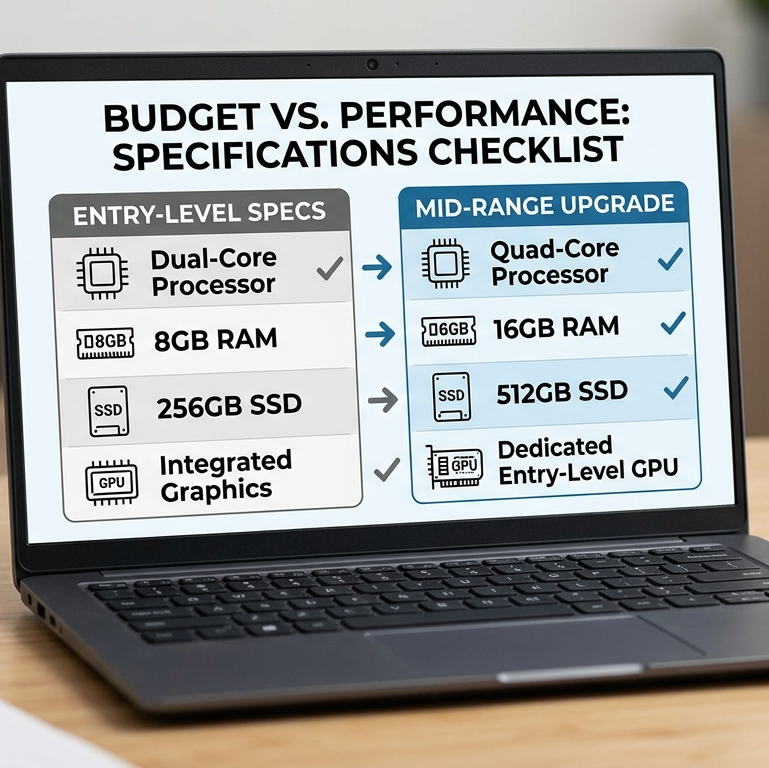
Here’s something that rarely appears in reviews but affects your experience every single day: the difference between a slow eMMC drive and a real NVMe SSD is enormous.
eMMC storage — common in laptops under £300 — is essentially the same technology used in budget smartphones. It’s fine for storing files, but when your operating system is booting off it, opening applications, or writing temp files during a demanding task, the slowness becomes visceral. Cold boot times of 45–60 seconds. Applications that take three or four seconds to launch. File transfers that feel like they’re running through treacle.
A proper NVMe SSD at the low end (something like a PCIe Gen 3 drive) transforms the experience. Boot times drop to under ten seconds. Apps snap open. The machine feels fast even if the processor is middling.
My advice: If a laptop under £350 is using eMMC, be very intentional about that choice. It’s workable for someone who just browses the web and streams video. For anyone doing actual work — writing, coding, spreadsheets, anything — try to stretch to a model with an M.2 NVMe drive. The difference in day-to-day feel is larger than upgrading the processor by one tier.
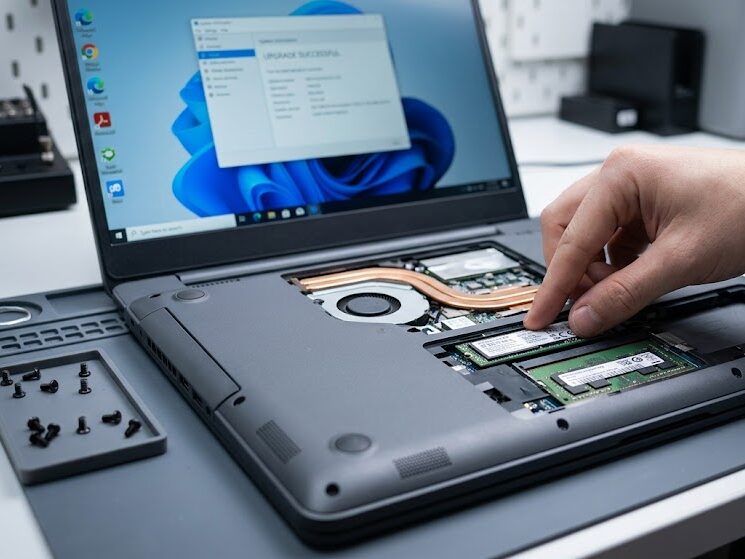
Also worth checking: whether the storage is soldered to the motherboard or user-upgradeable. On budget laptops, soldered storage is increasingly common, which means you’re stuck with whatever you buy. If a machine ships with 256GB and you can add more later via an M.2 slot, that’s a meaningful advantage over one where 256GB is your ceiling forever.
RAM: 8GB Is the Floor, Not the Ceiling
There’s a persistent myth that 8GB of RAM is “plenty” for general use. In 2026, with modern browsers, background sync processes, and operating system overhead, 8GB is the minimum that keeps things functional — not comfortable.
I’ve watched a colleague try to use a budget laptop with 8GB RAM and Chrome with twelve tabs open alongside a Slack instance and a Zoom call. It was genuinely painful. The machine didn’t crash. It just became progressively more sluggish until everything felt like wading through mud.
16GB makes that scenario disappear entirely. If you can find a budget laptop with 16GB for a reasonable price — and more are shipping with this now — prioritise it over faster storage or a marginally better processor.
One nuance worth understanding: some budget laptops use dual-channel memory configuration (two physical sticks or a dual-channel single stick), which meaningfully improves performance, especially on AMD Ryzen chips where the iGPU shares memory bandwidth. This rarely gets mentioned in listings, but it can make a 10–15% performance difference in real tasks.
Battery Life: Marketing Numbers vs. Reality
Every laptop manufacturer inflates battery life claims. A laptop advertised at “up to 12 hours” will typically deliver 7–8 hours under real-world workloads — browser open, screen at 60% brightness, occasional video playback.
Budget laptops often suffer more from this gap than premium ones, because they’re using lower-capacity batteries to reduce cost and weight. I’ve tested budget machines that claimed 10 hours and delivered closer to five under anything resembling actual use.
What to look for: Battery capacity in watt-hours (Wh) tells you more than the manufacturer’s claimed hours. Anything above 50Wh in a 14–15-inch machine is decent. Above 60Wh is good. Some budget laptops now ship with 72Wh batteries, which is remarkable at the price point.
Also consider charger size. Budget laptops that charge via USB-C rather than a proprietary barrel connector give you more flexibility — you can top up from a power bank, share chargers with other devices, and replace the cable easily if it breaks.
Build Quality: The Compromise That Actually Ages
Plastic chassis laptops get a lot of criticism, but honestly, well-engineered plastic is perfectly fine. The issue isn’t the material — it’s whether the engineering behind it is decent.
A badly designed plastic chassis flexes when you lift the laptop by one corner. The keyboard deck bends when you type. The lid wobbles. The hinges feel loose after six months. These are signs of cost-cutting in the structural design, not just in the material choice.
By contrast, some budget laptops — particularly from Lenovo’s IdeaPad and HP’s Pavilion lines — use reinforced plastic that genuinely holds up well over years of use. The Lenovo IdeaPad Slim 5, for example, has a chassis that doesn’t embarrass itself next to machines costing twice as much.
The hinge test: Open and close the lid several times in a shop (or watch review videos doing this). A good hinge has consistent resistance throughout the range of motion. A cheap hinge will feel stiff at first and loose by year two.
The keyboard flex test: Press down firmly in the centre of the keyboard deck without pressing any keys. Visible flex is a warning sign. Some flex is inevitable in plastic construction, but excessive flex makes typing feel unpleasant and can damage components over time.
Operating System Choices in the Budget Tier
Windows dominates the budget laptop market, but ChromeOS and Linux machines deserve serious consideration depending on your use case.
Chromebooks have matured enormously. The integration of Android apps and Linux app support means a modern Chromebook can handle tasks that would have required Windows five years ago. For students, writers, and anyone whose workflow is browser-centric, a Chromebook at £250–£350 will outperform a Windows laptop at the same price simply because ChromeOS is lighter and more efficient. The trade-off is compatibility — if you need specific Windows software, Chromebooks become a genuine problem.
Linux laptops are increasingly viable for technical users. System76, Tuxedo, and even Lenovo now sell machines with Linux pre-installed at competitive prices. If you’re comfortable with Linux, you can often get significantly more performance for the price because you’re not paying the Windows licence fee, and the OS itself runs more efficiently on modest hardware.
Windows remains the default for good reason — compatibility is unmatched. But do yourself a favour and spend the first hour after setup uninstalling bloatware. Budget Windows laptops frequently ship with trial software, adware, and manufacturer utilities that consume RAM and slow everything down. A clean-ish install makes a noticeable difference.
Real-World Performance: What These Laptops Are Actually Good
Let me be honest about what budget laptops handle well and where they genuinely struggle.
They’re great for:
- Web browsing, email, video calls
- Word processing, spreadsheets, presentations
- Streaming video and music
- Light photo editing (resizing, cropping, basic adjustments)
- Coding and development work (depending on the project)
- Note-taking and research
- Remote desktop connections (where heavy compute happens on a server)
They struggle with:
- Video editing beyond 1080p timelines
- Running local AI/ML models
- Gaming beyond low settings on modest titles
- Sustained heavy compilation workloads
- Running multiple virtual machines simultaneously
The honest reality is that the vast majority of laptop users — students, remote workers, writers, casual creatives — fall squarely in the first category. For them, a £400 laptop in 2026 is genuinely sufficient. The premium laptop market thrives partly on aspirational purchases by people who do occasional tasks that don’t actually require premium hardware.
Brands Worth Trusting (and One Worth Watching)
After extensive use across the category, a few patterns emerge:
Lenovo IdeaPad / ThinkPad E-series: Consistently good keyboards, reliable build quality, usually upgradeable internals. ThinkPad E-series in particular offers business-grade durability at consumer prices.
Acer Aspire: Competitive specs for the price, though build quality varies. Their displays have improved significantly in recent generations.
HP Pavilion: Good balance of aesthetics and function. Battery life tends to be above average in this line.
ASUS VivoBook: A mixed bag historically, but the recent generations show real improvement in display and keyboard quality.
One to watch — Infinix and Tecno: These Chinese-origin brands have quietly been shipping surprisingly capable budget laptops in European markets over the past two years. Build quality isn’t matching the established players yet, but specs-per-pound is genuinely impressive, and they’re improving fast.
Frequently Asked Questions
Is it worth buying a refurbished laptop instead of a new budget one?
Often, yes. A refurbished mid-range laptop from two or three years ago can offer better build quality and performance than a new budget laptop at the same price. The risks are warranty length and battery degradation. Look for sellers offering at least a 12-month warranty and check their battery health claims carefully.
Should I buy the extended warranty on a budget laptop?
It depends on the manufacturer. For brands with strong reliability records (Lenovo ThinkPad especially), it’s often unnecessary. For lesser-known brands, the extended coverage can be worth it given higher variability in component quality.
Can a budget laptop run Microsoft Office?
Yes, comfortably. Modern Office runs well on budget hardware. If you’re using the web-based version via Microsoft 365, it runs even more smoothly.
What’s the minimum spec I should accept in 2026?
I’d say: AMD Ryzen 5 or Intel Core i5 (12th gen or newer), 8GB RAM (16GB preferred), 256GB NVMe SSD, 1080p display with anti-glare coating, and a 45Wh+ battery. Below these specs, you’re accepting trade-offs that will frustrate you within a year.
Are budget gaming laptops worth it?
They’re a niche worth understanding carefully. A laptop marketed as a “gaming laptop” at £500–£600 will typically have a discrete GPU (often an NVIDIA RTX 4050 or equivalent), but the thermal management at that price is often poor. The GPU will thermal throttle under sustained load, and the fans will be loud. For light to moderate gaming, it works. For serious gaming, you’ll feel the compromise within an hour.
Where the Market Is Heading
The next two years will be interesting. The ARM laptop revolution — led initially by Apple Silicon and now spreading to Windows via Qualcomm Snapdragon X and upcoming Intel/AMD ARM implementations — is pushing efficiency metrics that are starting to appear in the mid-budget tier.
We’re also seeing AI-accelerated processing features trickling down from premium machines. Neural Processing Units (NPUs) are appearing in budget-tier chips, enabling local AI features — real-time noise cancellation, background blur in video calls, intelligent battery management — without cloud round-trips.
Perhaps most encouragingly, display quality at the budget tier continues to improve meaningfully year over year. The dim, washed-out screens that defined cheap laptops are becoming genuinely rare below £500.
Conclusion
Buying a budget laptop in 2026 isn’t about managing disappointment. It’s about making informed trade-offs — and the informed buyer can get a machine that handles 90% of their daily computing with zero frustration.
The spec sheet matters, but it doesn’t tell the whole story. The display you stare at for hours matters more than the processor tier. The storage type shapes how the machine feels every time you use it. The battery determines whether you carry a charger everywhere or not.
I’d rather use a well-chosen £380 laptop every day than a carelessly specced £700 one. That gap is closable with knowledge — and hopefully, this guide has shortened it a little.
The best budget laptop is the one that handles everything you actually do, fits in your bag without resentment, and still works properly in three years. That machine exists at this price point. You just have to know what you’re looking for.
Written from genuine hands-on experience across multiple budget laptop categories. Specifications and pricing reflect UK market conditions as of June 2026.